Container tracking for importers & freight forwarders

Track every ocean container in the tools you already use.

Enter a container number. Container Tracker checks 7 shipping lines for you and shows status, location, vessel and ETA right where you work. No more logging into seven carrier websites. In Google Sheets, Salesforce and Claude, it also shows the last free day of every box, before demurrage and detention start.

Live · Google Workspace Marketplace

Google Sheets & Gmail

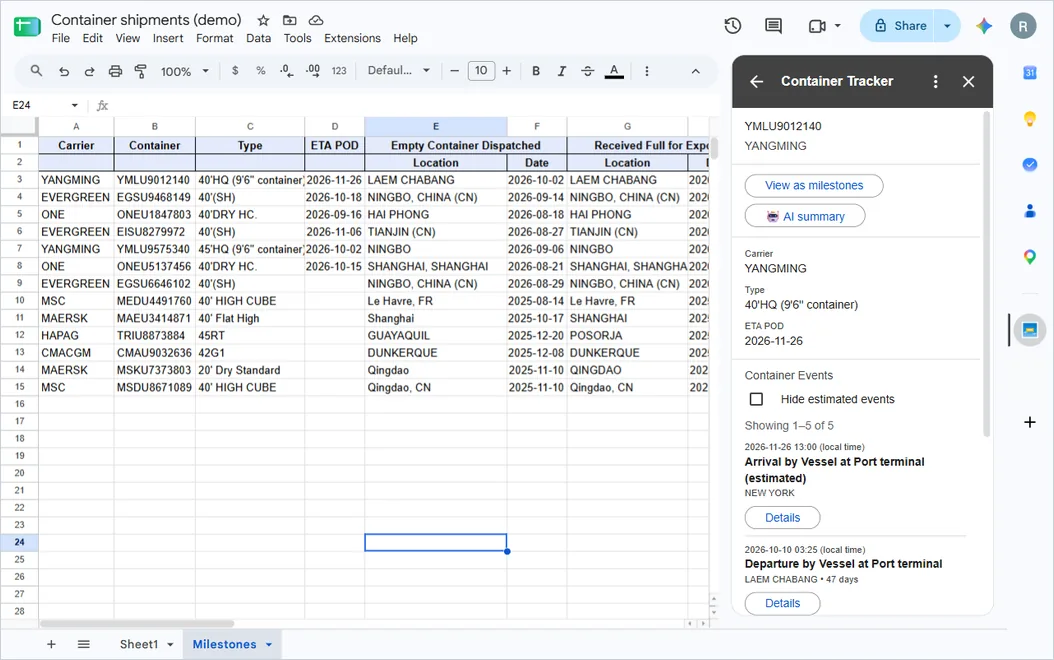
One add-on for both. Track containers from the side panel next to your spreadsheet, and track the ones you find in your inbox.

  • Status, location, vessel and ETA right next to your sheet
  • Milestones for all your containers, exported side by side
  • In Gmail: container numbers found in the email and its PDF, CSV or text attachments
  • Slack alerts: a message in your channel when a container departs, arrives or gets a new ETA
  • Free time: last free day and days left for every box, before demurrage and detention start
  • New: Bookings & shipping instructions: import booking and SI emails in one click, see every shipment's stage and cut-offs, export a printable copy to your sheet
Google Sheets with a milestones table for 13 containers and the Container Tracker side panel showing a container's ETA and events

Live · HubSpot App Marketplace

HubSpot

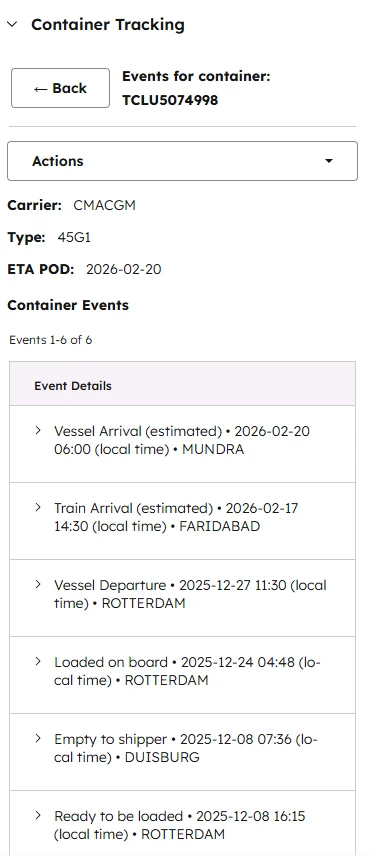
A Container Tracking card on your Tickets, so every shipment is tracked on the ticket it belongs to.

  • Enter the container number on the ticket; the card keeps it up to date
  • Full event history, milestones and a plain-language summary for customer updates
  • Your whole team sees the status without leaving HubSpot
  • Slack alerts when a container departs, arrives or gets a new ETA
The Container Tracking card in the HubSpot ticket sidebar: carrier, ETA and the event history of a container

Live · Salesforce package

Salesforce

Container tracking on your accounts and opportunities. Paste the numbers; status, ETA, vessel and every carrier event are kept up to date as Salesforce records.

  • Hourly sync of status, ETA, vessel, ports and the last and next event
  • Events and milestone dates are records, so reports and the included dashboard just work
  • Containers from imports, Flows and the API are tracked too
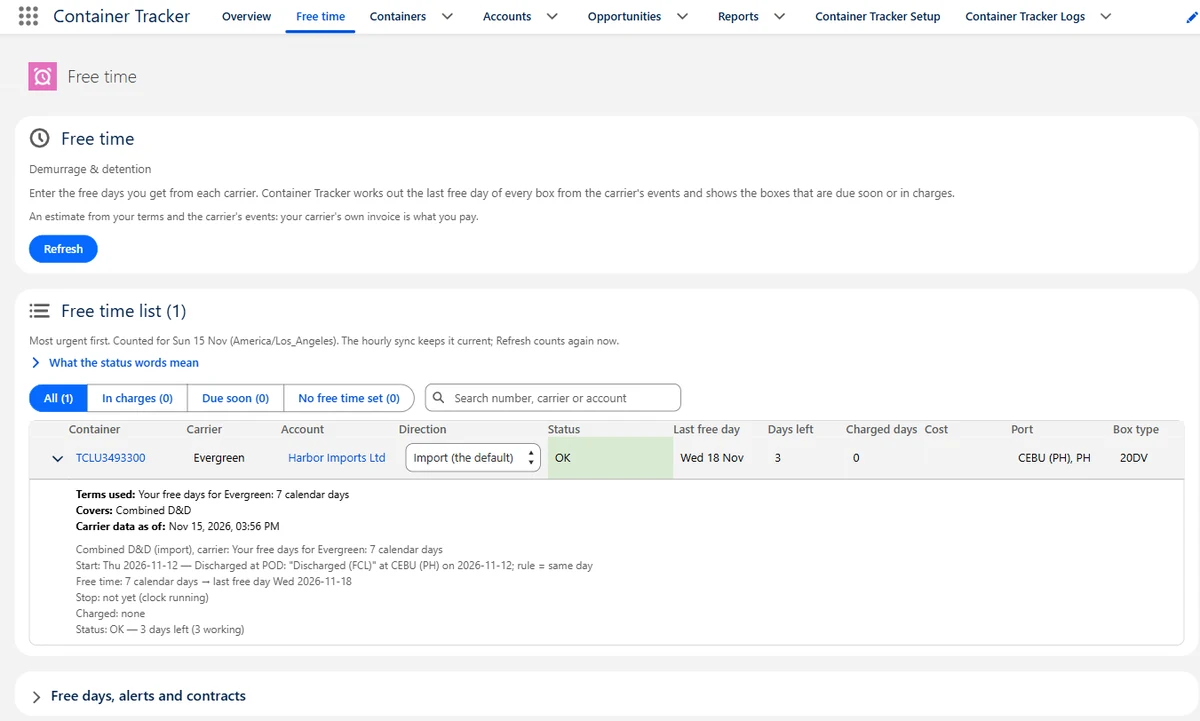
  • New: Free time: last free day and days left for every box, a morning email when one is due soon
  • A plain-language summary per container, field history and Slack alerts
The Free time tab of Container Tracker in Salesforce: the free time list with a box's status, last free day, days left and the terms used

New · Claude connectors directory

Claude

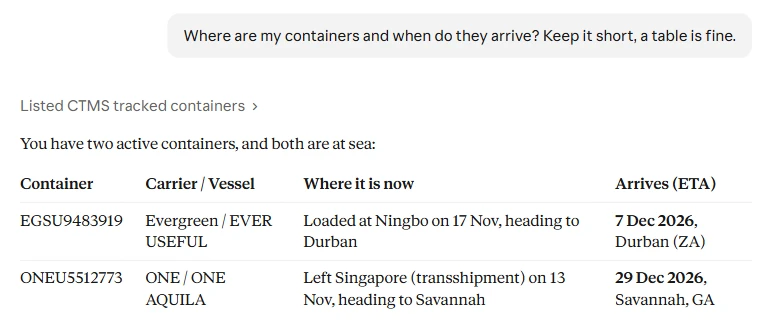
Tell Claude which containers to track and with which shipping line. CTMS follows them with the carriers from then on, so you can ask Claude where they are at any time.

  • Start with "Track MSCU1234567 with MSC"; Claude asks before it starts tracking
  • Then ask: "Where is my container, and has its ETA slipped?"
  • "What arrives in Rotterdam this week?"
  • Free time: "Which containers run out of free time before Friday?"
  • Sign in with a code sent to your email or with Google; no carrier accounts
A Claude chat: asked where the containers are, Claude lists two containers from CTMS with carrier, vessel, current position and ETA

New · Shopify App Store

Shopify

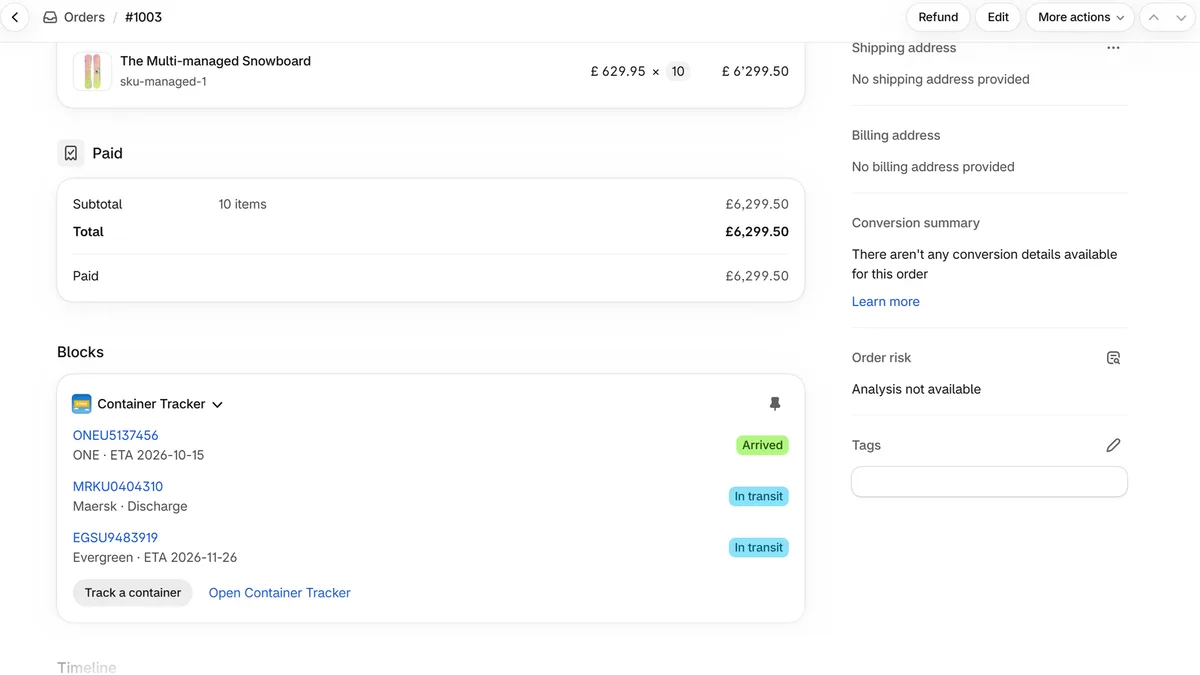
Container tracking on your orders. A block on the order page shows each container's status and ETA, so you see which orders are waiting on which shipment.

  • Containers, carrier, status and ETA right on the order
  • A Containers page with Arriving in 7 days and Needs attention
  • Billed through your Shopify invoice
A Shopify order page with the Container Tracker block listing three containers with carrier, ETA and status

In review · monday.com marketplace

monday.com

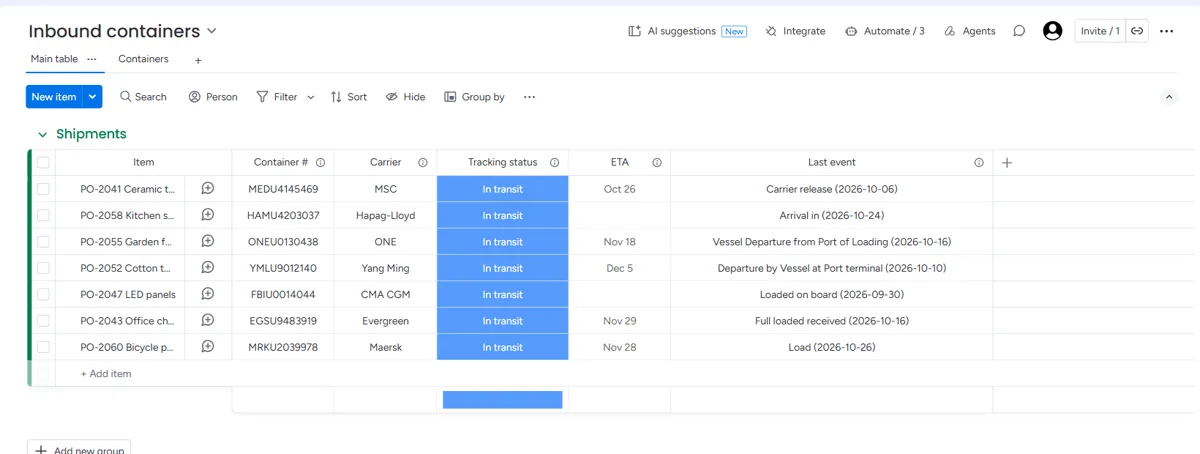
Container tracking on your boards. Type a container number in a column; status, ETA and the last event fill in on their own.

  • Works on your own board or a ready-made template
  • Automations update your columns when the carrier reports something new
  • Billed through your monday.com account
A monday.com board with container numbers, carriers, the Tracking status In transit, ETA dates and the last event of each container

Still checking carrier websites one container at a time?

Container Tracker does the checking for you. Your first update usually arrives about a minute after you add a container, and new events keep coming in until it's delivered.

7 carriers, checked automatically

MSC, Maersk, Hapag-Lloyd, CMA CGM, ONE, Yang Ming and Evergreen. Any other carrier: add events by hand, or paste a screenshot of the tracking page and AI fills them in.

Milestones, not noise

Gate in, loaded, departed, arrived, discharged, delivered: the milestones that matter, side by side for all your containers.

Customer updates in one click

An AI summary explains where the container is, what changed and what comes next, in plain English, ready to paste into an email.

Lives where you work

No new platform and no logins to share. Container Tracker opens inside the tool your team already uses: your spreadsheet, your inbox or your CRM.

Supported Carriers

Container Tracker checks these shipping lines automatically and adds new tracking events to your container's history as they happen:

Shipping with another carrier? Track the container manually: add events yourself, or paste a screenshot of the carrier's tracking page and AI extracts the events for you.

Bring your own key

Already have an API key from your carrier?

Many ocean carriers give their customers access to their tracking API, either included with the account or as a paid service. If you have a key, Container Tracker can track your containers through it. This also works for carriers we don't track automatically yet.

  • Used only for your containers. Your key tracks your own shipments and nothing else.
  • Check it yourself. Your carrier's API portal shows how your key is used, so you can confirm this at any time.
  • You stay in control. Revoke or replace the key on the carrier's portal whenever you like.
Ask about API tracking

Just tell us which carrier you use. Please don't send the key by email; we'll agree a safe way to connect it.

How It Works

  1. Install Container Tracker for your platform: the Google Sheets & Gmail add-on or the HubSpot app or the Salesforce package, or connect CTMS in Claude, or the Shopify app. monday.com is in review.
  2. Add a container number, e.g. MSCU1234567, where it belongs: in the Sheets side panel, next to an email in Gmail, on a HubSpot ticket, on a Salesforce account or opportunity, on a Shopify order. The carrier is detected from the number (in Claude, you name the carrier).
  3. Follow its journey: the full event history, key milestones (Gate In, Loaded, Departed, Arrived, Discharged, Delivered) and an AI summary of where the container is now. New events keep coming in until it's delivered.
  4. Share and report: paste the summary into a customer email, or export lists, histories and milestones to Google Sheets.

Step-by-step guides: Google Sheets · Gmail · HubSpot · Salesforce · Claude · Shopify · monday.com

Pricing

The same plans on every platform.

Free

$0

No credit card needed.

Pick your platform

What happens after 10 containers? Nothing is deleted. Your containers and their history stay available, and you can keep tracking manually for free, or upgrade to keep new containers updating automatically.

Tracking more than 20 containers a month? Contact us and we'll put together a plan that fits your volume.

Prices in USD. Cancel anytime.

Frequently Asked Questions

Which platforms does Container Tracker work in?

Google Sheets and Gmail (one add-on for both), HubSpot, Salesforce, Shopify and Claude (as a connector) today. The monday.com app is in review on its marketplace; see Platforms. Every version tracks the same carriers and has the same plans.

Which shipping lines can I track automatically?

MSC, Maersk, Hapag-Lloyd, CMA CGM, ONE (Ocean Network Express), Yang Ming and Evergreen. Containers from any other carrier can be tracked manually or imported from a screenshot.

Can I use my own carrier API key?

Yes. If your shipping line has given you an API key (some include one with your account, others charge for it), tell us which carrier and we'll set up Container Tracker to track your containers with it. There's no need to send the key by email; we'll agree a safe way to connect it. The key is used only for your own containers, and your carrier's API portal shows how it is used, so you can check this at any time. This also works for carriers we don't track automatically yet.

Where do I find Container Tracker in Google Sheets?

Container Tracker is a Google Workspace add-on, so it is not in the Extensions menu. Open any spreadsheet and click the Container Tracker icon in the right-hand side panel. If the side panel is hidden, click the small arrow at the bottom right of the window. See the Google Sheets guide.

The Container Tracker icon in the right-hand side panel of Google Sheets, circled, with the label Click here

Is there a spreadsheet template I can start with?

Yes: the free container tracking spreadsheet template. It has the same Milestones layout as the add-on plus a dashboard, so you can type containers in by hand and let the add-on fill the rows later.

Does it work in Gmail?

Yes. Open an email and click the Container Tracker icon in the right-hand side panel. It lists the container numbers in the email and the shipping line, shows the latest status of the ones you already track, and tracks new ones in one click. Container lists in PDF, CSV or text attachments are found with Scan attachments. The email is read inside Google; only the container numbers are sent to us. The same install works in Google Sheets and Gmail. See the Gmail guide.

Does it work in Claude?

Yes. CTMS is a connector in the Claude directory. Connect it in Claude under Plugins, sign in with a code sent to your email or with Google, and tell Claude which containers to track and with which shipping line. Then ask in plain words: where a container is, what arrives this week, which boxes run out of free time. Claude asks before it starts or stops tracking. The Claude account is separate from the add-on and the other apps, with the same Free and Pro plans. See the Claude guide.

Does it show demurrage and detention free time?

Yes, in Google Sheets, in Salesforce and in Claude. Enter the free days you get per carrier (calendar or working days, demurrage and detention combined or separately, import or export): every box gets its last free day, days left and status, worked out from the carrier's own events. In Google Sheets, click Update Free time sheet; in Salesforce, the Free time tab lists the boxes and the hourly sync keeps them current; in Claude, tell it your free days and ask which boxes are due. In Google Sheets and Salesforce, a morning email (and Slack, when connected) warns before a last free day. On paid plans in Google Sheets you can enter your contract terms with rates to see the cost per box. The numbers are an estimate; the carrier's invoice is what you pay. See the free time guide for Google Sheets or Salesforce or Claude.

Can I get alerts in Slack?

Yes, in the Google Sheets & Gmail add-on, in HubSpot and in Salesforce, on every plan. Click Slack alerts (Home card in Google, the Container Tracker card in HubSpot, the Container Tracker Setup tab in Salesforce) and Connect Slack, then pick a channel. Container Tracker posts there when a container departs, arrives, gets a new ETA or stops updating. It can only post to that channel; it can't read your Slack messages. See the Slack guide for Google or HubSpot, Salesforce.

Does it work in HubSpot?

Yes. The HubSpot app adds a Container Tracking card to your Tickets, so each shipment is tracked on the ticket it belongs to. See the HubSpot guide.

How much does it cost?

Your first 10 containers are free, with no credit card needed. After that, Pro is $15/month and covers up to 20 containers a month plus 400 AI credits. Save with a longer subscription. Tracking more containers? Contact us for a plan that fits your volume. See Pricing.

How often is a container checked?

The first check runs right after you add a container, and your first update usually arrives in about a minute. After that, Container Tracker checks about every 6 hours while the container is moving, less often during quiet periods, until it is delivered.

What happens when I reach my 10 free containers?

Nothing is deleted. Your containers and their history stay available. You can keep tracking manually for free, or upgrade to keep new containers updating automatically.

Does "20 containers a month" mean 20 at a time?

It means 20 new automatically tracked containers per billing month. Containers you are already tracking keep updating.

Is my data safe?

We store only your email, your name and the container numbers you submit, on Microsoft Azure in the EU. In Google Sheets, the add-on only writes to the spreadsheet you are working in, and only when you click an export. See the Privacy Policy.

Can I cancel anytime?

Yes. In Google Sheets, Gmail or HubSpot, open My Profile and click Manage Subscription. You keep access until the end of the period you paid for.

How do I keep stakeholders updated?

Open a container and use the AI summary for a plain-language status update, or export milestones to a sheet to compare many containers side by side.
Contact Us

For support or feature requests, please contact us.

Stop checking carrier websites.

Your first 10 containers are free. Setup takes two minutes.